When building streaming platforms, testing new codecs, or tuning encoding ladders, one of the hardest questions is: “How do we objectively measure video quality?”
Traditional metrics like PSNR (Peak Signal-to-Noise Ratio) and SSIM (Structural Similarity Index) often fail to reflect what viewers actually see. PSNR, for example, is a simple mathematical calculation that measures pixel differences, which means it can give a high score to a video that looks visually poor, while SSIM, though better at assessing structural similarity, can still be deceived by certain video artifacts.
To address these limitations, Netflix developed VMAF (Video Multi-Method Assessment Fusion), a perceptual quality metric that has become the industry standard. VMAF is a more sophisticated approach because it uses a machine learning model that takes multiple factors into account, including PSNR and SSIM, but also other human perception characteristics. This fusion allows VMAF to provide a single, comprehensive score that is much more aligned with how a human eye perceives quality.
How VMAF works?
VMAF combines multiple quality metrics and feeds them into a trained machine learning model. The result is a score between 0 and 100.
The metric is computed by comparing two videos:
- Reference video - the original, uncompressed source
- Distorted/transcoded video - a compressed, transcoded, or otherwise degraded version
VMAF analyzes differences frame by frame, producing either a single aggregate score or a per-frame curve. Because it accounts for perceptual factors, it better matches how humans judge quality than simple pixel-based metrics.
VMAF Score Ranges
- 95–100 → identical to reference, differences invisible
- 90–95 → near-lossless, barely noticeable differences
- 80–90 → good quality, typical for premium streaming
- 70–80 → noticeable degradation but acceptable
- 60–70 → clear artifacts, borderline watchable
- 50–60 → poor quality
- <50 → very poor, hardly watchable
Visibility of differences
- 1–2 points → not perceptible
- 3–5 points → borderline noticeable in side-by-side comparison
- 6+ points → clearly visible in normal viewing
Technical prerequisites for accurate measurement
Even the best metric can produce misleading results if the test setup is incorrect. For reliable VMAF scores, the following conditions should be met:
- Same resolution - upscale or downscale one of the videos if necessary. Mismatched resolutions can artificially inflate or deflate scores.
- Same frame rate (fps) - differences in fps will confuse the algorithm and produce inaccurate results.
- Frame alignment - videos must start and end at the same points. Even a one-frame shift can drastically alter results.
- Same format - matching bit depth and chroma subsampling (e.g., 4:2:0 8-bit) is essential.
Practical examples
If you take the following ABR ladder for 1080p content:
| Bitrate | Resolution | FPS | Notes |
|---|---|---|---|
| 400 kbps | 426×240 (240p) | 25 | Minimum acceptable quality, for mobile on poor networks |
| 800 kbps | 640×360 (360p) | 25 | Still mobile-focused, better readability for text |
| 1200 kbps | 854×480 (480p) | 25 | SD quality, watchable on small screens |
| 2400 kbps | 1280×720 (720p) | 50 | HD baseline, good balance for tablets/TV |
| 3500 kbps | 1920×1080 (1080p) | 50 | Full HD, streaming standard for TVs |
| 4500 kbps | 1920×1080 (1080p high profile) | 50 | Higher motion/detail content (sports, action) |
Measuring VMAF for each transcoded stream against the original reference video might yield the following trend:
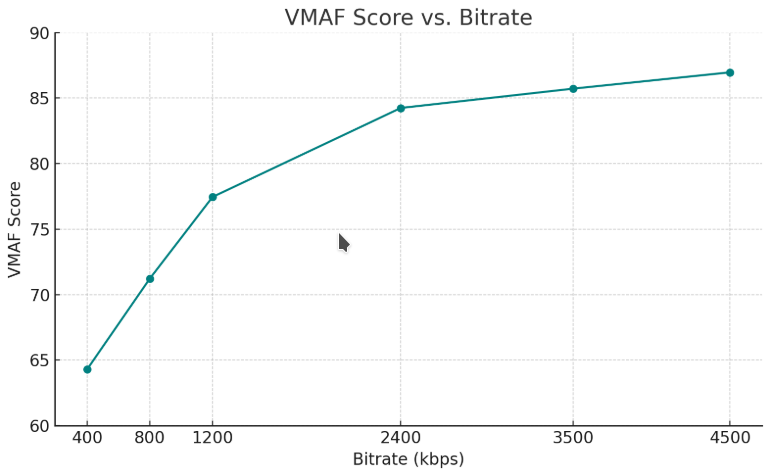
Plotting these values in a graph (X-axis = bitrate, Y-axis = VMAF score) clearly illustrates the relationship between bitrate and perceptual video quality, helping you decide the optimal ladder levels for adaptive streaming.
EasyVMAF – simplified workflow
EasyVMAF is a Python library that streamlines video quality assessment using VMAF. It allows easy comparison between reference and distorted videos, automatically manages models and configurations, and outputs results in JSON format.
Get easyVmaf docker image:
docker pull gfdavila/easyvmaf:latest
Run easy VMAF from docker container:
docker run --rm -v <local-path-to-your-video-files>:/vmaf_files gfdavila/easyvmaf -r /vmaf_files/video-1.mp4 -d /vmaf_files/video-2.mp4
This makes EasyVMAF ideal for quick comparisons, pipeline integration, and automated video quality evaluation, without the need for manually configuring complex parameters.
Strengths and limitations
Strengths ✅
- Strong correlation with human visual perception
- Open-source and actively maintained
- Scriptable and easy to integrate into workflows
Limitations ⚠️
- Requires a reference video (not suitable for no-reference scenarios)
- Sensitive to upscaling, sharpening, or other preprocessing
- Accuracy depends on correct technical setup
Conclusion
VMAF provides a robust, perceptually-aligned metric for video quality, bridging the gap between mathematical measures and actual viewer experience. While highly reliable, it is best complemented with occasional subjective tests to detect subtle artifacts. By combining VMAF with practical tools like EasyVMAF, video engineers can efficiently optimize bitrate ladders, encoding, and codec evaluation, delivering the best possible viewing experience.