Introduction – When Your First Guess is Wrong
You install a PCIe device.
You boot your system.
You run:
lspci
…and it’s not there.
Your first instinct?
“I probably need to install a driver… again.”
That’s usually the wrong conclusion.
For many modern PCIe devices, if the system can’t see the hardware, the problem isn’t in the OS at all - it starts much earlier.
Before drivers. Before Linux. Even before the OS boots.
To understand what’s really going on, we need to go one level deeper.
What actually happens when you power on a machine
Before Linux (or any OS) is involved, the system follows a strict hardware-to-software handoff:
-
CPU power-on & reset vector:
The moment power stabilizes, the CPU wakes up. It is hardwired to look at a specific memory address (the Reset Vector) where the firmware instructions begin. -
Firmware Execution (UEFI/BIOS):
Firmware is a low-level software stored on a small memory chip on the motherboard. It acts as the first code that runs when the system powers on. Firmware takes total control and runs POST (Power-On Self-Test) to make sure CPU, RAM, and power supply are all working.💡 Think of it as a doctor checking if the patient is alive and all the vital organs are working.
-
Hardware initialization
The goal of this step is to ensure that “every device is operational and ready to be seen by the OS”. For example, it performs Memory Training to ensure the RAM sticks are communicating reliably at the correct speeds.💡 Think of it as the doctor carefully examining each of the patient’s organs to make sure they function properly.
-
Device Discovery:
The BIOS/UEFI firmware scans all buses and controllers on the motherboard, including PCIe slots, USB controllers, and storage interfaces.
It identifies every connected device, assigns system resources (like memory addresses, I/O ports, and interrupts), and builds a complete hardware map.This map is then exposed to the operating system, allowing it to recognize and communicate with all devices.
Without this step, devices may be physically present but completely invisible to the OS. -
The Handover:
Once all hardware is initialized and the device map is complete, the firmware hands control over to a bootloader on a storage device, such as GRUB (GRand Unified Bootloader) on Linux or Windows Boot Manager on Windows.
The bootloader’s job is to load the operating system kernel into memory and start its execution.Once the OS takes control, drivers rely on each device’s own firmware to operate correctly.
At this point, the OS can only interact with devices that firmware successfully initialized.
👉 Important point:
Hardware is not discovered by the OS first - it is presented to the OS.
If something goes wrong here, the OS will never even know the device exists.
Firmware beyond BIOS/UEFI
When most people say “firmware,” they immediately think of BIOS. But modern systems contain multiple layers of firmware that all play a role in hardware initialization:
- BIOS/UEFI: Initializes CPU, memory, PCIe slots, and performs the POST and device enumeration.
- BMC (Baseboard Management Controller): Handles remote management, server power control, and monitoring. Common on server motherboards.
- CPLD / Onboard Controllers: Control low-level board logic, power sequencing, and other hardware-specific tasks.
- Device Firmware: Each PCIe device (GPU, NIC, FPGA, or encoder card) may contain its own firmware to initialize and manage its internal hardware.
Think of the BIOS as the conductor, and all other firmware as orchestra sections. Each must play its part perfectly before the OS even gets to perform.
The key takeaway: the operating system only sees what firmware exposes. If a device isn’t initialized correctly at the firmware level, the OS cannot see it - no driver can fix that.
So why does this happen specifically with PCIe devices?
When we say PCIe devices, we don’t mean only add-in cards. A PCIe device can be anything connected over the PCIe bus - GPUs, NICs, NVMe drives, or specialized accelerator cards.
In this article, we’ll mostly focus on add-in PCIe cards, since they are the most common source of these issues.
Unlike simpler buses, PCIe is not just “plug and play” at the electrical level. For a PCIe device to appear in the system, several things must align before the OS even starts:
1. Lane availability (CPU ↔ slot wiring)
Every PCIe device requires a certain number of lanes (x1, x4, x8, x16).
A lane is a pair of high-speed data links - one for sending and one for receiving data. You can think of lanes as independent “data highways” between the CPU and the device.
More lanes = more bandwidth.
For example:
- x1 - 1 lane (basic devices)
- x4 - 4 lanes (NVMe SSDs)
- x8 / x16 - high-throughput devices (GPUs, accelerators)
Those lanes come directly from the CPU (or sometimes through a chipset), and they are physically routed to specific slots on the motherboard. If slot does not have the required lanes available or they are shared with another device, the device may:
- ❌ Fail to initialize (The system won’t even see it)
- 📉 Downgrade its link (e.g., an x16 GPU running at x8 speeds)
- 👻 Ghosting (Appears and disappears randomly)
👉 Not all slots are equal, even if they look identical.
2. PCIe bifurcation (the silent killer)
If lanes are the “data highways,” then bifurcation is the ability to paint new lines and create separate exits on that highway.
Modern CPUs can take a single x16 slot and split it into multiple smaller, independent links (e.g., x16 → x8/x8 or x4/x4/x4/x4). This is crucial because some cards(devices) are actually “multi-device” boards masquerading as a single physical card.
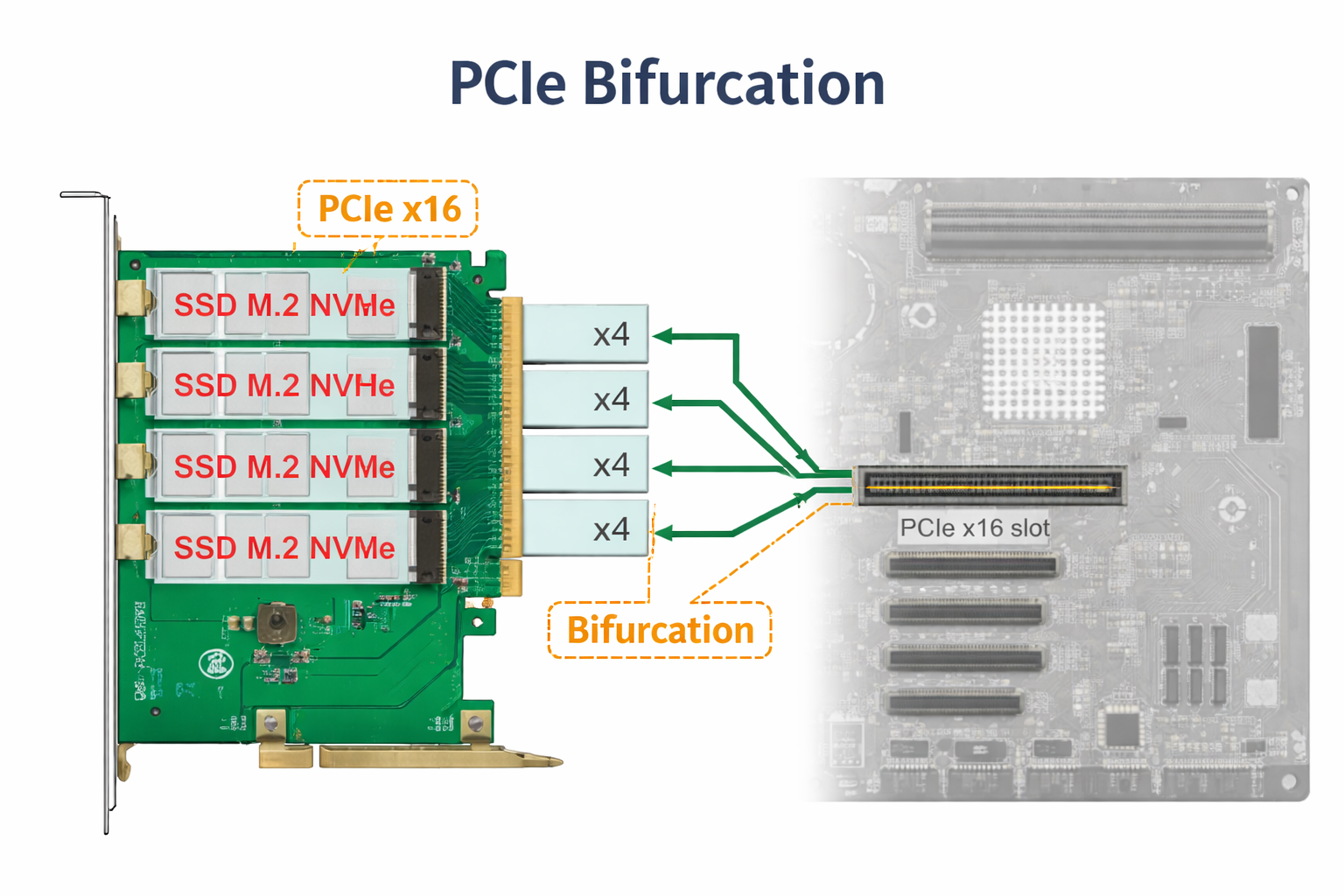
Some PCIe cards (especially NVMe adapters, FPGA boards, or specialized accelerator cards) depend on this behavior to expose multiple internal devices.
If bifurcation is:
- not supported by the motherboard
- not enabled in BIOS
- or configured incorrectly
👉 In many cases, the system might see only the first internal device (e.g. one SSD out of four), leaving the rest in a hardware limbo.
No error. No warning. Just… nothing in lspci.
3. Firmware Configuration & Resource Allocation
Physical connectivity is only half the story. Even if your PCIe device is correctly plugged in and has the required lanes, the firmware (BIOS/UEFI) still needs to properly configure it before the OS can use it.
This process involves a few key steps:
- Slot Enablement & Bifurcation
A slot may be physically x16, but firmware controls how it actually operates. It can split lanes (bifurcation), limit bandwidth, or even disable the slot depending on the configuration and other devices in the system. - Resource Assignment (MMIO & Interrupts)
Every PCIe device needs system resources to function - mainly memory-mapped I/O (MMIO) space and interrupts. The firmware is responsible for assigning these resources and building the hardware map.
If there isn’t enough available address space (which can happen in systems with multiple GPUs or accelerator cards), some devices may simply not be initialized at all.
- Link Speed Negotiation
The firmware also determines the PCIe generation and link speed (Gen3, Gen4, Gen5). In some cases, forcing a lower generation in BIOS can improve stability if the signal quality is marginal.
This is why BIOS updates often appear to “fix” hardware issues. In reality, they improve:
- device compatibility
- resource allocation logic
- and firmware tables used during initialization
A newer BIOS can make previously invisible devices suddenly appear — without any changes in the OS or drivers.
4. Link Training & Device Initialization
Even with correct lane configuration and firmware setup, a PCIe device still needs to successfully establish a physical link with the system. This process is called link training. During link training, the system and the device negotiate:
- how many lanes will be used
- at what speed (Gen3, Gen4, etc.)
- and whether the signal is stable enough for reliable communication
If this process fails, the link never becomes active - and the device is not detected at all.
-
Signal integrity: PCIe operates at very high speeds, which makes it sensitive to signal quality. Poor riser cables, long traces, or unstable power delivery can prevent the link from stabilizing. In these cases, the device may fail to appear or only work at a reduced speed
-
Device initialization (onboard firmware): Many modern PCIe devices are not passive - they run their own internal firmware. Devices like SmartNICs, FPGAs, or encoder cards need to initialize internally before they can respond to the system.
If this initialization fails or takes too long - firmware may skip the device during discovery.
Conclusion
If a PCIe device doesn’t appear in lspci, the OS is not the problem.
The failure already happened earlier - during firmware initialization, lane configuration, resource allocation, or link training.
Reinstalling drivers or tweaking the OS won’t help. Instead, check:
- BIOS detection
- Slot configuration (lanes, bifurcation)
- Resource assignment (MMIO, interrupts)
- Link training and device firmware
👉 If the hardware isn’t visible to the firmware, the OS can’t see it - and no driver can fix that.