Introduction – Why This Matters
Security is one of the most critical aspects of backend development, yet the concepts of authentication and authorization are often confused or mixed up. No matter if you’re building a web application, a REST API, or a distributed microservices system, it’s essential to know who the user is and what they’re allowed to do. This blog post will explain these two fundamental concepts in plain terms, outline how they work together, and offer best practices every backend developer should follow to build secure applications.
What is Authentication?
Authentication is the process of verifying who the user is. It answers the crucial question: “Are you really who you claim to be?”
Typically, this involves the user providing credentials that your system can validate, such as a password, a fingerprint, or a token. On the backend, your system validates these credentials to confirm the user’s identity, usually by comparing them to stored information. Once a user is successfully authenticated, they gain access to the system. However, what they can actually do within that system is then determined by authorization.
It’s also common for backend systems to delegate this entire authentication process to third-party identity providers like Keycloak, Auth0, Okta or even social logins (Google, Facebook). These providers manage user identities and issue tokens, effectively offloading the complexity of secure credential storage and verification from your application.
Common authentication methods:
Modern applications support a variety of authentication methods, each designed for specific use cases - from simple user logins to secure machine-to-machine communication. Understanding these methods helps you choose the right level of security and user experience for your application. Below are the most commonly used approaches:
-
Username and password
Is the most common login method. Users enter a username (or email) and password, which is verified against a securely hashed version in the database.
✅ Pros ❌ Cons 🛡️ Tips Simple to implement Weak alone Hash passwords Universally supported Prone to phishing and brute-force attacks Enforce strong passwords Familiar to all users Users often use weak or reused passwords Add MFA for better security -
Multi-Factor Authentication (MFA)
Adds an extra layer of security by combining different types of verification factors-something you know (like a password), something you have (such as a phone or hardware token), or something you are (biometric data). This multi-layered approach makes it much harder for attackers to gain access to an account, even if one factor is compromised.
✅ Pros ❌ Cons 🛡️ Tips Significantly increases security Adds extra steps for users Use authenticator apps or hardware tokens Protects against stolen passwords Requires additional setup and maintenance Encourage users to enable MFA Supports multiple verification methods (apps, biometrics, hardware) Security depends on the strength of second factor Avoid SMS when possible -
OIDC (OpenID Connect on top of OAuth2)
OIDC is a standardized way to verify a user’s identity using an ID token issued by a trusted authority over the OAuth2 protocol.
While OAuth2 primarily handles authorization, OIDC builds on top of it to provide authentication. This allows applications to confirm who the user is by trusting an identity provider like Google, Microsoft, or Keycloak.
An identity provider (IdP) is a service that authenticates users and issues identity tokens on their behalf. Acting as a trusted source of user information, IdPs let applications offload the complexity of login and user management. Popular providers include Google, Microsoft, Keycloak, Auth0, and Okta.
After the user logs in through the identity provider, the application receives a signed ID token (usually a JWT), which it sends to the backend - where the token is validated to confirm the user’s identity and extract relevant user info.
OIDC Authentication Flow – Step by Step
- User tries to access a protected resource in your app
- App redirects the user to the Identity Provider’s login page (e.g. Google)
- User authenticates successfully
- Identity Provider redirects back to the app with an ID token confirming the user’s identity and access token (optionally)
- The app validates the ID token by verifying its signature with the Identity Provider’s public key to ensure it’s issued by a trusted source, and also checks claims like issuer, audience, and expiration to confirm it’s valid and meant for the app.
In simple terms, ID token is like a digital ID card issued by a trusted authority. If all checks pass - your app can safely trust the user’s identity without needing to manage passwords or sessions directly.
✅ Pros ❌ Cons 🛡️ Tips Standardized authentication protocol Adds complexity in implementation Use well-tested libraries Offloads user login to trusted providers Requires token validation Always verify signature and claims Enables Single Sign-On (SSO) Must handle token expiration Implement token refresh mechanisms 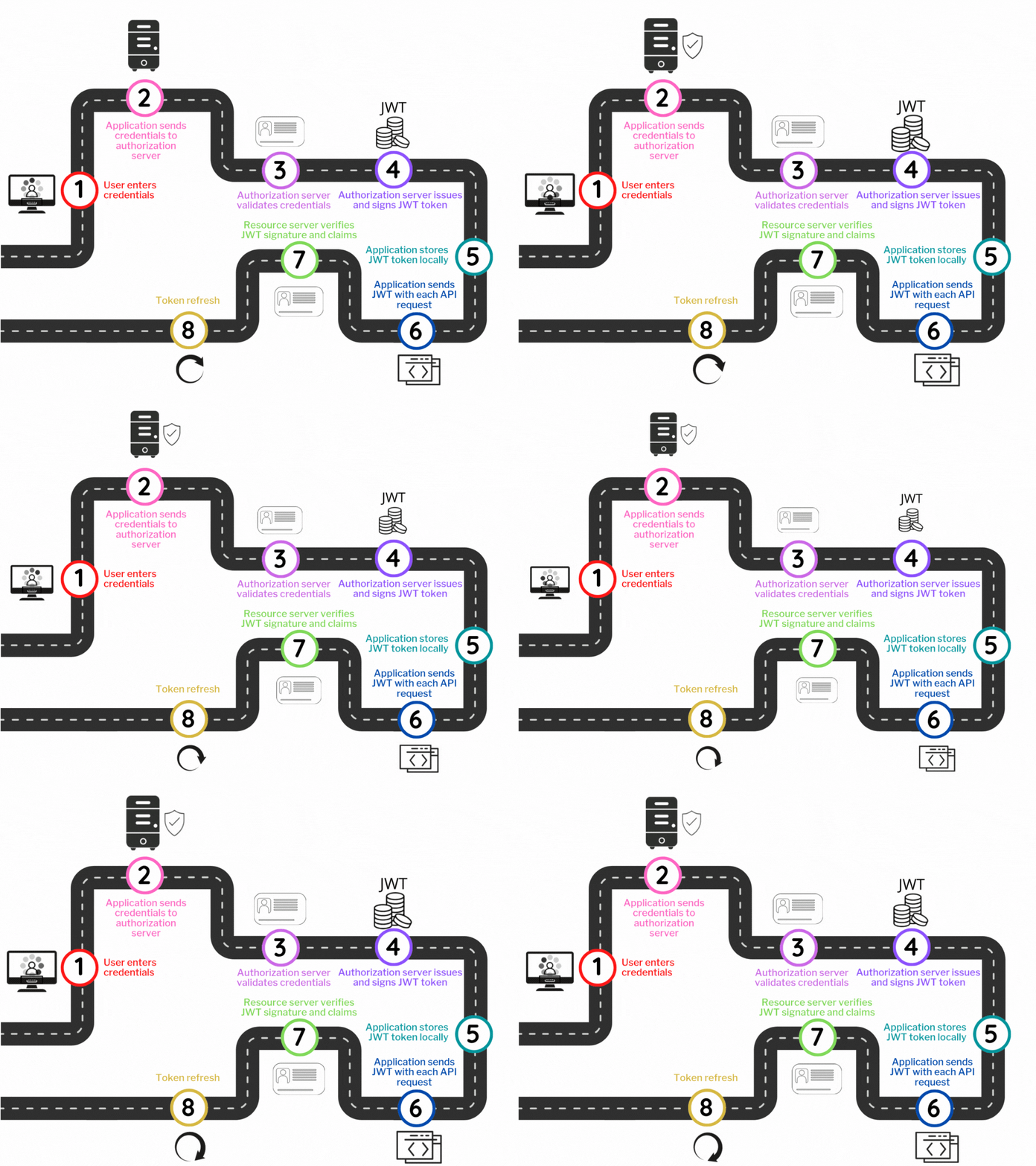
-
SAML
SAML (Security Assertion Markup Language) enables Single Sign-On (SSO) by allowing users to authenticate once with a central IdP, and then access multiple applications without logging in again. When the user accesses an application, the app redirects them to the IdP, which verifies their identity and returns a signed SAML assertion containing the user’s identity details. SAML assertion is a signed XML document issued by the Identity Provider that securely conveys a user’s authentication status and related identity information to the application.
If the user is already authenticated, the IdP skips the login step and immediately returns the assertion. Each application validates the assertion’s signature and grants access, enabling seamless login across trusted systems without re-entering credentials.
-
Biometric authentication
Biometric authentication verifies a user’s identity using unique physical traits like fingerprints, facial recognition, or iris scans. It offers a fast and user-friendly login experience, often used in combination with other factors for stronger security (e.g., 2FA).
-
Machine-to-Machine Identity: API Keys, Certificates, and Tokens
Machine-to-machine authentication commonly relies on various methods such as API keys, tokens, or digital certificates to prove identity. These approaches enable services to securely communicate and access resources without user involvement, ensuring trusted and authorized interactions.
-
API Keys are simple secret tokens that a client includes in each request to authenticate itself. They can be sent via HTTP headers (e.g., x-api-key), query parameters, or in the request body. API keys are easy to implement but usually lack fine-grained permissions and expiry controls.
-
Token-based authentication relies on passing a signed token with each request to prove identity, typically using the Authorization: Bearer header.Tokens can be issued via OAuth2, custom auth systems, or generated as JWTs, and allow stateless, secure access without sending credentials each time.
-
Certificate-based authentication uses digital certificates to verify the identity of a client or server during a secure connection (usually via TLS). In mutual TLS (mTLS), both sides present certificates, enabling trusted machine-to-machine communication without passwords or tokens.
-
Tips for choosing an authentication method:
- Balance security and usability: Stronger methods like MFA offer more security, but may affect user experience.
- Use industry standards whenever possible (e.g., OAuth2 + OpenID Connect for web/mobile apps).
- Avoid implementing your own auth: Leverage trusted identity providers (e.g., Keycloak, Auth0, Okta).
- Different contexts need different methods: Use API keys or mutual TLS for backend systems, and username/password + MFA for user-facing apps.
- Protect secrets: Whether it’s passwords, tokens, or certificates - always store them securely.
What is Authorization?
While authentication answers the question “Who are you?”, authorization determines “What are you allowed to do?” - it governs the access rights and permissions of an authenticated user or service within your application or system.
In simpler terms, authorization controls whether a user or service has permission to perform a specific action or access certain resources after their identity has been verified.
Common models:
There are several common ways to implement authorization policies:
-
Role-Based Access Control (RBAC): Permissions are grouped into roles such as admin, editor, or viewer. Each user is assigned one or more roles, and their access to resources depends on the roles they have.
-
Attribute-Based Access Control (ABAC): Access is granted based on specific characteristics (attributes) of the user, the resource, or the environment. For example, a user from the marketing department can access marketing reports, or access might be allowed only during working hours.
-
Scope-Based Authorization: Commonly used in OAuth2 and OpenID Connect, where tokens carry scopes that specify the exact permissions granted to the token holder. These scopes define which actions are allowed, such as read:files for reading files or write:profile for updating user profiles. This approach provides fine-grained access control without giving broad permissions to the user or service.
-
Ownership-Based Authorization: Access is granted based on whether the user owns the resource they want to access or modify. For example, a user can view or edit only their own profile information, documents, or posts, but cannot access or change data that belongs to other users. This model ensures users have control over their own data while protecting others’ information.
In addition to the models mentioned above, there are other authorization approaches such as policy-based, discretionary, mandatory, and context-based access control, which are used in more complex or specialized systems to provide extra flexibility and security.
Summary
-
Authentication verifies identity - confirming who the user or service is.
-
Authorization verifies permissions - confirming what the authenticated user or service can do.
Together, they form the foundation of secure application design, ensuring that users not only prove who they are but also access only what they are allowed. Without proper authentication, unauthorized users could gain access, and without proper authorization, authenticated users might perform actions beyond their privileges, leading to potential security breaches. Implementing both correctly is essential for protecting sensitive data, maintaining user trust, and complying with regulatory requirements. Ultimately, authentication and authorization work hand-in-hand to create a robust security framework that safeguards applications against unauthorized access and misuse.
What’s Next?
With the basics covered, start implementing secure authentication and authorization in your projects. Explore OAuth2, add multi-factor authentication, and design precise access controls. Stay updated on security best practices to keep your applications safe and resilient.